A connected workspace for commerce operations
Luma brings orders, stock, fulfillment and procurement together across Shopify, JTL-Wawi and Cin7 Core. Workflows move the work forward, and people approve what matters.
Luma is in active development. We're inviting commerce teams to explore focused early deployments.
Workspace
One place for the work and the decisions
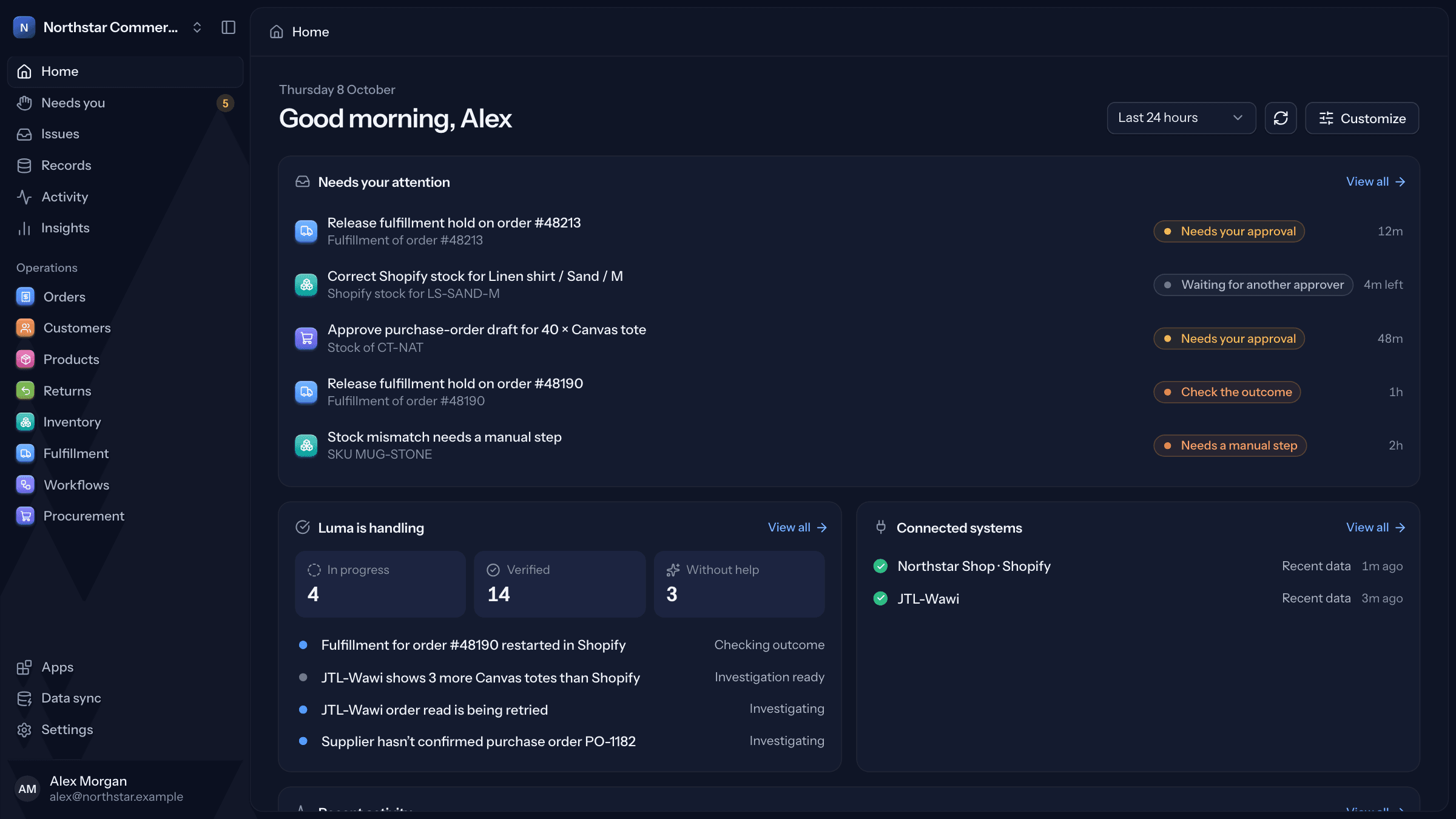
Your team works in Home, Needs you, Issues and Records, and in pages for orders, customers, products, returns, inventory, fulfillment and procurement.
Needs you first
Approvals, manual steps and outcome checks in one queue, whichever Workflow raised them.
Details beside the list
Open an order or issue beside the list to see its evidence, linked issues and Workflow runs without losing your place.
Search and ask
Press ⌘K to find anything. Ask Luma (⌘J) answers questions about orders, stock and issues, and links each answer to the records it came from.
Built for daily work
Dense without clutter, with keyboard shortcuts, light and dark mode, in English and German.
Workflows
Workflows carry out the work, step by step
Each Workflow starts from a trigger — a detected issue, a schedule or low stock — and runs a fixed list of steps. It keeps going when a system is slow, follows your approval rules and ends by checking the result.
Templates
Start from a built-in Workflow and adjust it.
Describe it
Write what should happen. Luma drafts the steps and lists its assumptions and questions for you to check.
Build visually
Add steps one by one: read data, check a condition, ask for approval, wait, act, check the result.
Write code
Edit a whole Workflow as code, with code steps for logic a rule can't express.
Test first
Run a Workflow with example replies, then test it on real issues without changing anything. Every published version is kept, so you can always see what ran.
What should happen?
Workflow draft
Reorder low stock
- 1
Condition
Available stock is below 20
- 2
Action
Draft a purchase order for the usual supplier
- 3
Approval
Ask you to approve it before it's sent
The right tool for each step
Rules and APIs
For steps known in advance. Fast, exact and repeatable.
Workflows
For work that spans systems and time and must keep going when something fails.
Code steps
For calculations a rule can't express.
Language models
For drafting Workflows and answering questions with links to the records.
People
For approvals and real trade-offs that someone should own.
Templates
Start from a Workflow that already works
Built-in Workflows handle common work in stock, fulfillment, procurement and connections. Use them as they are, adjust them to your rules, or build your own from there.
Built-in Workflows
More templates are on the way, and any of them can be the starting point for your own.
Correct Shopify stock from the ERP
When Shopify and your ERP disagree, set Shopify to the quantity your ERP reports.
How it runs
- 1
Starts
Shopify and your ERP disagree on linked stock
- 2
Read data
Read both systems again right before acting
- 3
Approval
Someone approves the new quantity
- 4
Action
Set available stock in Shopify
- 5
Result check
A fresh read confirms Shopify matches
Control
You decide what needs approval
Choose standard approval rules, or require approval for every change. Either way, Luma shows what it's about to change and checks the outcome afterwards.
Always applies
- Permissions checked again before a change runs
- A risk level on every change
- A fresh read to confirm the outcome
- Every decision recorded in Activity
Changes proposed by Workflows wait for approval, and a fresh read checks every outcome.
Workflow tests show how a Workflow would have handled real issues, without changing anything, before you decide what it may do.
Verification
Work is done when the result is confirmed
A system accepting a change doesn't mean the problem is solved. Luma only counts an issue as resolved once a fresh read from the system confirms the intended outcome.
Accepted isn't done
Luma tracks a change being accepted and the outcome being confirmed as two separate states.
On the record
Every decision, change and check is recorded in Activity, with who did what and when.
Never silent
If Luma can't confirm the outcome, the issue stays open and goes to Needs you.
Change and outcome check
Change
Accepted
An accepted change doesn't prove the issue is fixed. Luma checks the outcome separately.
Outcome check
Confirmed
The outcome matched what the change was meant to do.
History
- Approved
Approved in Needs you
14:02:11 - Checked again
Order checked again: nothing changed
14:02:12 - Not a result yet
Shopify accepted the hold release
14:02:13 - Observed
Fresh read: the hold is gone
14:02:20 - Observed
Fulfillment has started
14:41:05 Resolved and confirmed
14:41:05Confirmed by a fresh check
Connected systems
Connected today, with more to come
Luma connects to the systems you already use, with no migration to get started. It reads what it needs and makes changes through clear, defined actions under your approval rules.
Shopify
Reads
- Orders
- Fulfillments
- Products
- Stock
- Returns and refunds
- Customers
Can change
- Set available stock
- Release a fulfillment hold
- Reopen a fulfillment
- Move remaining items to another location
JTL-Wawi
On-premise and JTL Cloud
Reads
- Orders
- Fulfillments
- Products
- Stock
- Customers
- Purchase orders
Can change
- Change an order's shipping method
- Send an approved purchase order
Cin7 Core
Reads
- Orders
- Fulfillments
- Products
- Stock
- Refunds
- Customers
- Suppliers and purchase orders
Can change
Coming next
Marketplaces, warehouse and 3PL systems, carriers. Tell us what you use — it helps us decide what comes first.
Security and data
Trust is part of the product
Letting software make changes in live systems takes more than good intentions. These controls are part of how Luma works.
Roles and permissions
Owner, Admin, Member and custom roles decide who can see, approve and change what. Sign-in supports passkeys and authenticator apps.
Approvals
Changes wait for approval under your rules, and every decision is recorded with its reason.
Audit trail
Activity is an append-only record of what people and Luma did.
Verification
Success means a fresh read confirmed the intended outcome. A sent request isn't enough.
Privacy
Workspace data is stored in the European Union. Connection credentials are encrypted and deleted when you disconnect. We don't train AI models on your data.
Early deployments
Start with a focused early deployment
Luma is in active development. We're looking for commerce teams who want to put it to work on a focused part of their operations, and help shape what comes next.
What you get
- Direct access to the people building Luma
- Terms agreed before any work starts
- A real say in what we build next
Teams that work with us this closely become design partners: they help decide what Luma does next.
- 1
A conversation
How your operation runs, which systems are involved and where the effort goes.
- 2
A fit check
What Luma can take on for you today, and whether a deployment makes sense.
- 3
A focused start
Connect the systems involved, start with reading, and agree which changes need approval.
- 4
Review together
Look at what worked and decide what Luma should take on next.
Common questions
Do we have to replace our ERP or shop system?
No. Luma connects to the systems you already use and works alongside them.
What access does Luma need?
Read access to the systems involved. Luma changes data only through the defined actions listed above, under your approval rules. Everything it does is recorded in Activity.
Which systems do you work with?
Shopify, JTL-Wawi (on-premise and JTL Cloud) and Cin7 Core today. If you use something else, tell us which systems and versions, and we'll check what's possible before we start.
How much of our team's time does it take?
Most of the effort comes at the start, while we learn how your operation runs. We agree the scope with you so it stays manageable.
What does it cost?
We agree terms with you before any work starts, based on what the deployment covers.
Is our data used to train AI models?
No. Workspace data is stored in the EU, and when an AI feature uses a model, it gets only the data that task needs.
Direction
Commerce is where Luma starts
Today, Luma is focused on commerce operations. It grows from there, one proven building block at a time.
Today
A connected workspace for commerce operations
Shopify, JTL-Wawi and Cin7 Core, with Workflows for orders, stock, fulfillment and procurement.
Planned
More of the operation
More connected systems, more Workflows, and a workspace you can shape around your team.
Later
Beyond commerce
The same building blocks, for other kinds of operations.
Let's talk about how your business runs
Tell us how your operation works, what takes more effort than it should, and what you'd want a better system to do. We'll tell you honestly whether Luma can help today.
Partners, integrators and people who know the industry are just as welcome.